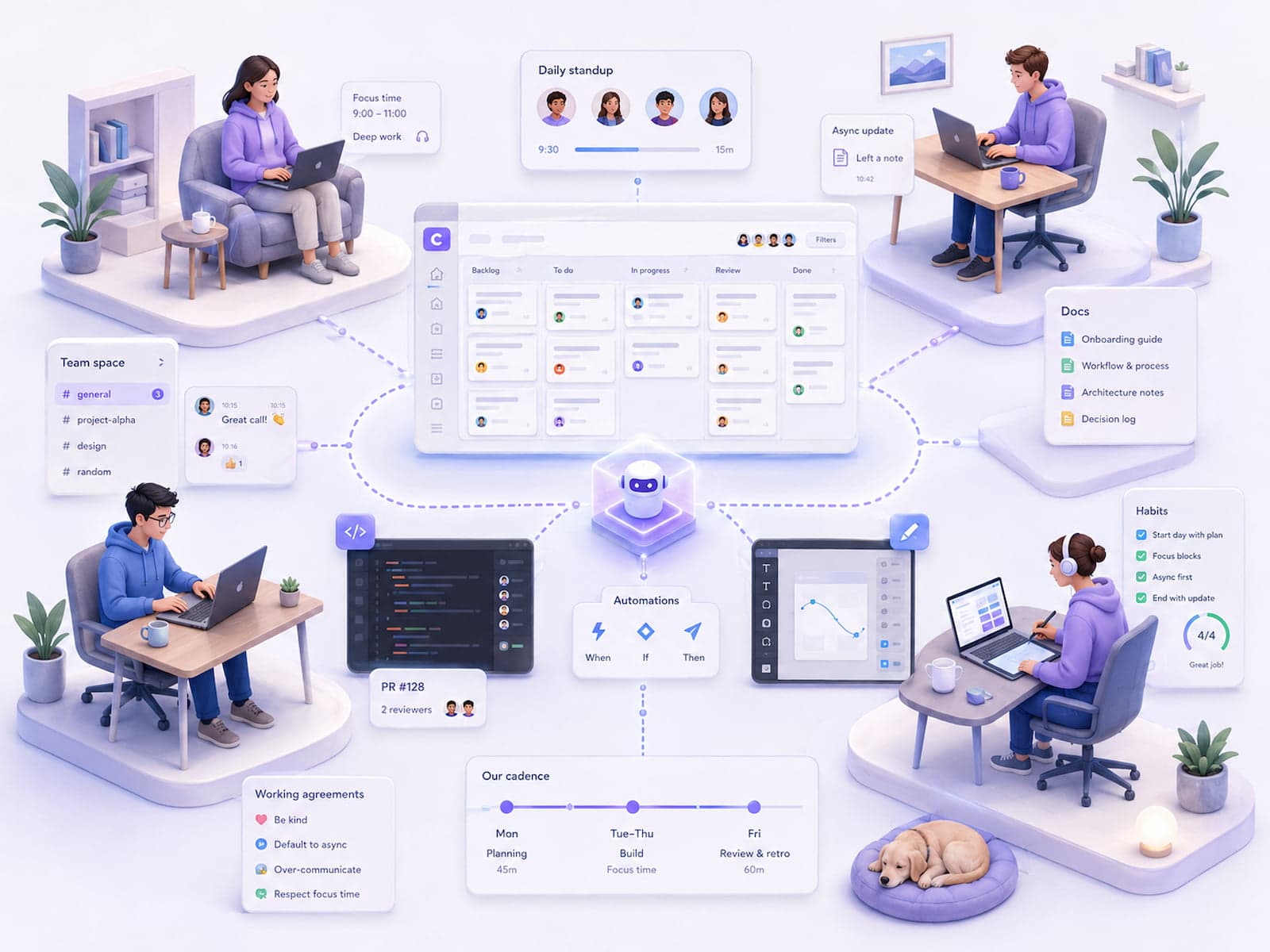
Corevanix operates on a remote-first structure, and the workflow has been refined considerably since our first projects. This article offers an inside look at how we actually work — daily rhythm, tooling, habits that work, and pitfalls. It's not a manifesto, just what we actually do: lessons from our first full year, plus Q1 2026 refinements.
If you're currently considering a remote setup, or looking to refine your current one, you might pick up a few ideas here — from the Corevanix perspective, in a Hungarian market context.
The setup
Our structure combines an always-available core team with a specialized partner network engaged per project and per specialty. Both are remote-first; collaboration runs on a CET-based schedule, with a defined overlap window for partners in other time zones.
The structure in early 2026
- Core team: always available, fully remote; owns strategy, technical decisions, and client relationships
- Partner network: specialized partners engaged per specialty (SAP, frontend, mobile, data, AI), brought on per project, under NDA
- Time zone: CET-based working hours; a defined overlap window for partners in other time zones
The core team is 100% remote, and the vast majority of partners also work remotely (a few use co-working spaces part-time).
Why remote?
A few reasons behind our remote-first decision:
- Talent availability. Budapest's tech talent pool was already tight by 2024 — a remote-first structure means hiring isn't limited by where someone lives.
- Cost optimization. A Budapest office for a small core team runs 1-1.5M HUF/month. Remote: zero.
- Employee preference. 60-70% of the 2024 tech talent pool was already looking for fully remote roles.
- Client accessibility. Many of our clients are outside Budapest or abroad — remote-first communication feels more natural to them too.
Daily flow — a typical day's rhythm
Not everyone follows this rhythm exactly, but here's the general pattern:
8:30 — async morning check-in on Slack
Whoever's online writes down their 1-3 priorities for the day. Example:
Morning! Today's priorities:
1. Client X — discovery call summary + scope draft (due: tomorrow)
2. Client Y — code review on PR #142
3. Internal — prep for weekly retro

Available 9-17 CET. Heads up: client call between 14-15.
This 2-3 minute daily "where I am" message dramatically cuts down on "where's X?" type questions.
9:00 — first work block
Usually deep work (coding, writing docs, architecture planning). Slack notifications off, calendar blocked. A 90-120 minute block.
The myth of "4 hours of morning deep work" doesn't hold up for us — a 90-120 minute block is more realistic between meetings and async updates.
11:30 — async update on Slack
Progress on the morning's priorities. "X done, Y in progress, Z blocked on ___" — 1-2 sentences.
12:00-13:00 — lunch
Office-like flow, sometimes 15 minutes, sometimes an hour. Nobody's timing it.
13:00 — afternoon meeting block
Client calls, internal reviews. We cap this at 2 hours to preserve focus — avoiding the "back-to-back meetings all afternoon" anti-pattern.
15:30 — second work block
Usually post-meeting action items, code review, PR merges. Less "deep work" than the morning block — often more reactive.
17:30-18:00 — async wrap-up on Slack
What got done today, what's left for tomorrow. 2-3 minutes, similar to the morning check-in. E.g.:
Wrap-up:
✓ Client X — scope draft done, review tomorrow
✓ Client Y — PR review comments added
⏳ Internal retro: tomorrow morning
🚫 Blocked: waiting on client Z's response
Tooling stack in detail
Tooling is every remote team's "secret recipe." Here's ours as of Q1 2026:
Communication
| Tool | Use case | Cost / month |
|---|---|---|
| Slack | Daily standup, ad-hoc chat, per-client project channels | $7/user |
| Google Meet | Meetings (up to 2-3 participants) | (included in Workspace) |
| Zoom | Larger meetings (4+ participants) | $15/host |
| Loom | Async video (a 5-minute recording instead of a 25-minute meeting) | $12.5/user |
| Client communication (by policy) | $0 |
Project management
| Tool | Use case | Cost |
|---|---|---|
| Linear | Internal projects + agile ticket tracking | $8/user |
| Notion | Knowledge base, meeting notes, documents | $10/user |
| Google Drive | Contracts, invoices, long-form documents | (Workspace) |
| Cal.com | Meeting booking links (self-serve, for clients) | $12/user |
Dev
| Tool | Use case | Cost |
|---|---|---|
| GitHub | All code (private repos, branch protection) | $4/user |
| Vercel | Staging + production deploys (frontend) | $20/user (Pro) |
| Sentry | Error tracking | $26/team (Team plan) |
| Cursor / Claude Code | AI-assisted coding | $20-200/user |
Operations
| Tool | Use case | Cost |
|---|---|---|
| 1Password | Team-wide secrets storage | $7.99/user |
| Granola | Meeting notes (AI transcripts) | $14/user |
| Stripe | Client invoicing | (per-transaction) |
| Mintos / Wise | International payments to the partner network | $0-1% fee |
Total tooling cost per person per month
Full tooling stack cost per core team member: roughly 120-150 USD/month; the total scales linearly with core team headcount.
Not cheap, but the investment pays off — tooling flexibility is what makes the remote setup work.
Four habits that work
1. Async by default
All information travels in text form; video or calls happen only when truly necessary. A Loom message replaces the meeting 90% of the time.
Concrete example: code review feedback. Instead of "let's talk about this for 30 minutes," a Loom video walks through the complex parts. The reviewer watches it later and comments on the PR.
What this gets us:
- Asynchronous — the reviewer watches it whenever they have capacity
- Documentation-like — the Loom link stays around and can be referenced later
- Time-zone friendly — partners in other time zones can watch it during their own workday
When it doesn't work:
- High-stakes decision meetings (architecture review)
- Conflict resolution
- The first two weeks of onboarding a new person
2. Doc-first
Before every meeting: an agenda plus the relevant doc in Notion. The doc stays open during the meeting and is edited live. After the meeting: the doc itself is the meeting record — there's no separate "follow-up email."
The pattern:
1. Before the meeting: agenda + context doc shared (24h notice)
2. During the meeting: doc open, edited live
3. After the meeting: doc closed out, "action items" section filled in
4. Follow-up: nobody writes a separate email — the doc is the record
What this gets us:
- The doc base grows and stays searchable
- Faster onboarding for new team members (context already lives in Notion)
- Better meeting focus (participants come prepared)
3. Weekly retro
A 30-minute retro every Friday: what went well, what didn't, what we're changing. One doc holds all retro output, and every two weeks we review recurring themes.
The retro format:
1. Wins this week (5 min) — what are we celebrating?
2. Pain points (10 min) — what didn't go well?
3. Improvement actions (10 min) — what are we changing?
4. Recurring themes (5 min) — any patterns across the last 2 weeks of retros?
What this gets us:
- Psychological safety — problems can be named openly
- Continuous refinement — the workflow doesn't stagnate
- Team buy-in — every change is a shared decision
4. "Office hours" booking system
Instead of "can I bother X?" — every senior team member has a public Cal.com link. Bookable 15-30 minute slots, agenda required.
The pattern:
- Every senior has a Cal.com link
- 15-min slot: quick question, unclear scope
- 30-min slot: deeper discussion, technical review
- Agenda required on the booking form (1-2 sentences)
- No walk-ins
What this gets us:
- Senior time is protected (no random Slack DM interruptions)
- Juniors know exactly how to get senior time
- The agenda requirement keeps conversations productive
Three challenges and how we handle them
Challenge 1: Loneliness / isolation
Problem: Some team members struggled with social isolation in their first 3-4 months. The isolating effect of working from home isn't trivial — some showed depression-like symptoms.
Solution:
- A mandatory weekly "virtual coffee" — 20 minutes, no agenda, just chat. Random pairing each month.
- Quarterly in-person team gathering — a 2-3 day meetup, team building.
- Co-working budget — 50k HUF/month per person, for anyone who wants to work from a co-working space occasionally.
Result: after 6 months, every team member handles the remote setup well. "Isolation" is no longer the #1 issue in our quarterly survey.
Challenge 2: Time-zone overlap
Problem: when a partner works across several hours of time-zone difference, the meeting window shrinks — our morning CET hours are already afternoon for them.
Solution:
- A defined "overlap window" of 9:00-11:00 CET. Outside that, async only.
- Time-zone-aware booking — Cal.com automatically converts time zones.
- Hand-off docs — every async-passed item gets a "CET → partner time zone" context doc.
Result: partners in other time zones work 80% async and 20% in overlap meetings. Productivity stays stable.
Challenge 3: Documentation drift
Problem: documents in Notion go stale — nobody updates them. A doc that's 3-6 months old is often already "lying" to you.
Solution:
- A monthly "doc review" — every doc carries a "last reviewed" date. If it's older than 3 months, the owner checks it.
- No owner? → archive it (move to the "Archive" folder).
- A doc-owner field on every doc — the name of the person responsible for keeping it current.
Result: 70-80% of Notion content stays current. The remaining 20-30% gets archived quickly.
Tip: doc review should be a monthly ritual, not ad hoc. "Doc review Friday" is the last Friday of every month, 14:00-15:00 — a one-hour block we do together.
Tooling stack alternatives
A few alternative tools we considered but didn't choose:
Slack alternatives
- Microsoft Teams — enterprise-oriented, but lacks Slack's flexibility
- Discord — good for younger teams, but not business-grade
- Mattermost (self-hosted) — GDPR-friendly, but maintenance is time-consuming
Linear alternatives
- Jira — complex, over-featured for SME scale
- Asana — generic project management
- GitHub Issues — fine if everything ties back to the codebase
Notion alternatives
- Confluence — for teams already on the Atlassian stack
- Obsidian — markdown-first, single-user focused
- Coda — Notion-like, docs plus databases
- Google Docs — already in use, but search is weak
The choice is project-specific — there's no one-size-fits-all answer.
Who it suits, and who it doesn't
Remote isn't the right fit for everyone. Here's the pattern we've seen:
Good fit for remote
- Self-starter, structured — can set their own daily priorities without prompting
- Comfortable with async communication — doesn't mind Loom-style async updates
- Strong writing skills (50%+ of communication is text) — clear, concise writing
- Stable home office setup (internet, a quiet room, an ergonomic chair)
- Can solve problems independently, and knows when to ask — doesn't wait on senior help unnecessarily, but knows when it's worth it
- Good control over time management — pomodoro, deep work, "do not disturb" signals
Not an ideal fit for remote
- Extroverts who are energized by social contact — video calls don't replace the office coffee break
- Newcomers to the field (juniors — in-person mentoring is far more effective) — in-person mentoring is critical in the first 6-12 months
- People who prefer a looser daily structure — an "I'll get to it" attitude slows things down in a remote setting
- A home environment that doesn't support focus (kids, roommates, small living space) — distraction levels run high
- Visual/kinesthetic learners — learning over video calls is less effective for them
We don't consider either type "wrong" — a remote setup simply doesn't suit everyone. Some of our partner companies do better with a hybrid or office-only setup.
Hybrid alternative
The "1-2 office days a week, remote otherwise" pattern works well for many of our partner companies. We didn't choose it for our own setup, but we often recommend it on client projects to teams currently considering the transition.
A week in practice — Monday through Friday
A typical week for us:
Monday
- 8:30 morning check-in
- 9-12: deep work block (coding or doc writing)
- 12-13: lunch
- 13-14: weekly internal sync (45-min standup, small group)
- 14-17: client call or project work
- 17-18: wrap-up
Tuesday
- 8:30 morning check-in
- 9-13: deep work
- 13-16: client calls (1-2)
- 16-17: code review
- 17:30 wrap-up
Wednesday
- 8:30 morning check-in
- 9-12: deep work
- 12-13: lunch
- 13-14: 1:1 with manager (if applicable)
- 14-17: project work
- 17:30 wrap-up
Thursday
- 8:30 morning check-in
- 9-12: deep work
- 13-14: client demo (weekly, on active projects)
- 14-17: project work
- 17:30 wrap-up
Friday
- 8:30 morning check-in
- 9-12: deep work / open-ended (innovation time)
- 13-14: weekly retro (30 min + 30 min quietly reading through docs)
- 14-17: lighter tasks, code cleanup
- 17:30 wrap-up
We avoid tough client calls on Fridays — fresh retro takeaways shouldn't get lost in a heavy meeting day.
Anti-patterns — what not to do
1. An "always on" culture
An "online" Slack status doesn't mean always available. "Do not disturb" should be respected.
2. Expecting an "async, but reply immediately" response
An async message deserves a reply within 4 hours at most. If it's urgent, make it synchronous (call).
3. Too many meetings
A "2-3 daily standups + 4-5 syncs" pattern is exhausting in a remote setting. Cap the daily meeting budget at 2-3 hours.
4. Decisions without a doc
"We talked about it and decided" only counts if it's also recorded in a doc. Otherwise, treat it as lost.
5. Expecting "self-management" too early
A junior team member's first 3 months should include in-person or daily 1:1s with a senior. The assumption that "remote means self-managing" doesn't hold up.
Official resources and further reading
- GitLab Remote Manifesto — a pioneer of fully remote work
- Doist Remote Guide — async-first principles
- Buffer State of Remote Work — an annual industry survey
- Async Manifesto — community-driven async principles
- Notion remote-work templates — a collection of templates
Related articles from us: From Excel to SAP for SMEs — the project-management angle. AI implementation at Hungarian SMEs — SME team flow. AI lead assistant for an automotive SME — a live project workflow.
Wrapping up
By 2026, remote work is no longer a trend in the tech industry — it's the default option. But "spin up a Slack and go" doesn't work: remote discipline requires async-first communication, a doc-first culture, and deliberate team building.
The workflow described here isn't the way to do it — just one way that works for us. Your mileage may vary. But the underlying principles (async-first, doc-first, weekly retros, office-hours booking) show up across many successful remote teams — they're worth building on.
If you're interested in working with the Corevanix team, let's talk for 30 minutes — in the first five minutes you'll see how our team communicates, and you can decide whether it's a fit for your own setup.